Connect IDX Wallet
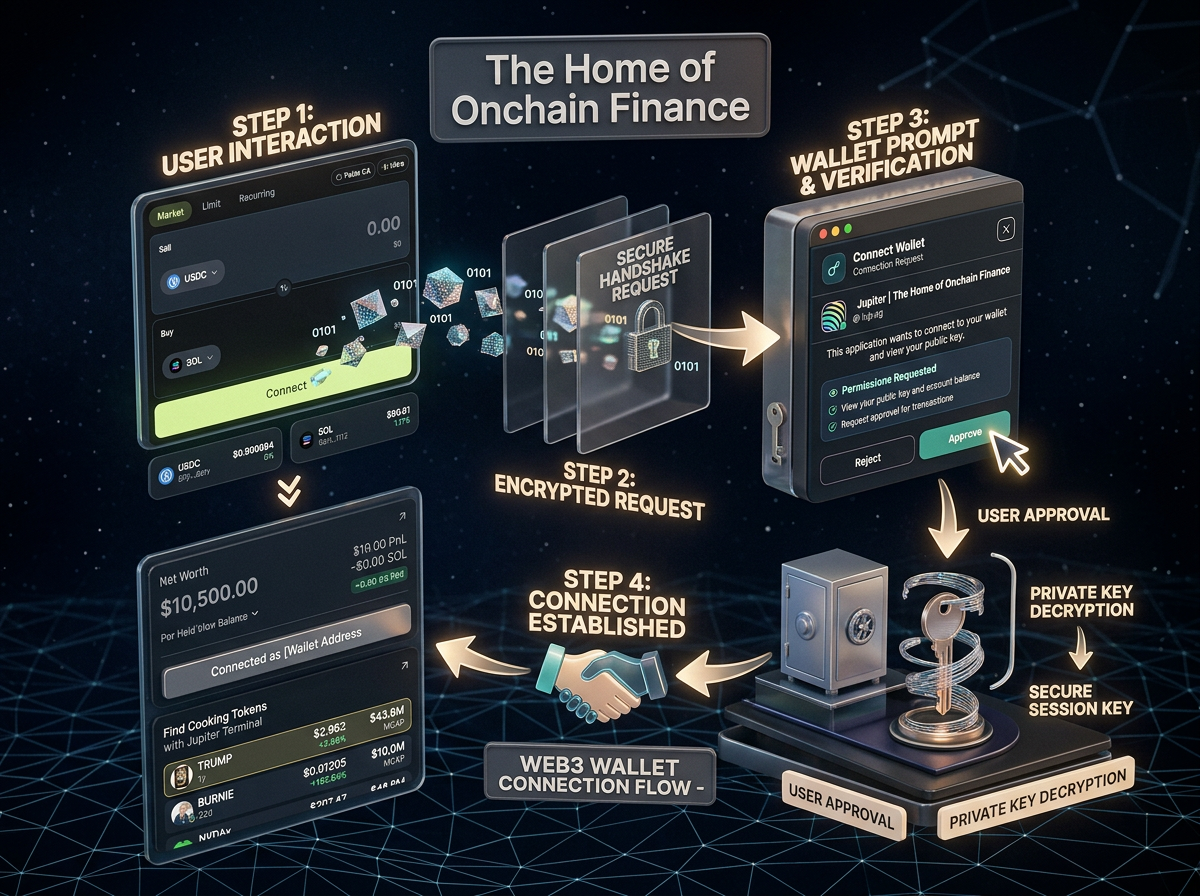
Connecting IDX Wallet enables users to interact with Solana dApps securely using a non-custodial model.
Your application never gets access to private keys. Instead, it reads the public key, sends transaction requests, and receives signed responses from the wallet.
IDX Wallet integrates with the Solana Wallet Adapter while also supporting custom injected providers for broader compatibility.
How Web3 Wallet Connection Works
IDX Wallet integrates with the Solana Wallet Adapter standard, which acts as a bridge between your application and supported wallets. This allows your application to support both standard adapter wallets and browser-injected providers.
When a user clicks Connect Wallet:
- The app scans for available wallets injected into the browser.
- It detects IDX Wallet via `window.solana.isIDXWallet` or similar providers.
- It lists all supported wallets (IDX, Jupiter, Coinbase, etc.).
- The user selects IDX Wallet.
- A secure permission popup is triggered.
- After approval, the app receives the user's public key.
Architecture of Connection
The connection system is built on two layers so apps can support both standard adapter wallets and browser-injected providers.
1. Adapter Layer
- -Uses @solana/wallet-adapter-react
- -Handles standard wallets such as Phantom and Solflare
- -Exposes unified methods: connect(), disconnect(), sendTransaction(), signTransaction()
2. Injected Provider Layer
- -Detects wallets directly from window injection
- -Supports IDX Wallet, Coinbase, Trust Wallet, Jupiter, and Brave Wallet
- -Provides fallback coverage when adapter metadata is unavailable
Wallet Detection Strategy
The app determines which wallets are available, which are installed, and which can be connected. This process is split into detection and installation validation.
Step 1: Detect Available Wallets
This function scans both adapter wallets and browser-injected wallets with SSR-safe checks to avoid runtime issues.
Reference Implementation
import {
  useWallet as useAdapterWallet,
  WalletNotSelectedError,
} from "@solana/wallet-adapter-react";

const {
  wallets: adapterWallets,
  wallet: selectedAdapter,
  publicKey: solanaPublicKey,
  connected: isSolanaAdapterConnected,
  connecting: isSolanaAdapterConnecting,
  connect: adapterConnect,
  disconnect: adapterDisconnect,
  select: adapterSelect,
  sendTransaction: adapterSendTransaction,
  signTransaction: adapterSignTransaction,
} = useAdapterWallet();

const detectWallets = useCallback(() => {
  if (typeof window === "undefined") {
    return {
      adapterWallets: adapterWallets.map((w) => w.adapter.name),
      coinbase: false,
      metamask: false,
      trust: false,
      brave: false,
      jupiter: false,
      idxWallet: false,
    };
  }

  return {
    adapterWallets: adapterWallets.map((w) => w.adapter.name),
    coinbase: !!window?.coinbaseSolana,
    metamask: !!window?.ethereum?.isMetaMask,
    trust:
      !!window?.trustwallet?.solana ||
      (window?.solana?.isTrust && !!window?.solana),
    brave: !!window?.braveSolana,
    jupiter: !!window?.jupiter?.solana,
    idxWallet: !!(
      (window?.solana?.isIDXWallet && window?.solana) ||
      window?.IdxWallet ||
      window?.idxWallet
    ),
  };
}, [adapterWallets]);IDX Wallet Detection Insight
IDX Wallet is detected using multiple fallbacks to support different injection patterns and browser behaviors.
Compatibility Fallbacks
window.solana?.isIDXWallet
window.idxWallet
window.IdxWallet
Why this matters
- -Supports different injection names from SDK and browser environments
- -Prevents false negatives during wallet discovery
- -Improves forward compatibility with future wallet updates
Step 2: Check If Wallet Is Installed
Detection alone is not enough. The app must confirm whether a wallet is actually installed and ready for user interaction.
Reference Implementation
const isWalletInstalled = useCallback(
  (id) => {
    if (typeof window === "undefined") return false;
    if (!id) return false;

    const normalizedId = normalizeWalletId(id);

    const adapter = adapterWallets.find(
      (w) => normalizeWalletId(w.adapter.name) === normalizedId
    );

    if (adapter) {
      return adapter.readyState === "Installed";
    }

    switch (id) {
      case "coinbase":
        return !!window?.coinbaseSolana;
      case "metamask":
        return !!window?.ethereum?.isMetaMask;
      case "trustwallet":
        return (
          !!window?.trustwallet?.solana ||
          (window?.solana?.isTrust && !!window?.solana)
        );
      case "brave":
        return !!window?.braveSolana;
      case "jupiter":
        return !!window?.jupiter?.solana;
      case "idxwallet":
        return !!(
          (window?.solana?.isIDXWallet && window?.solana) ||
          window?.IdxWallet ||
          window?.idxWallet
        );
      default:
        return false;
    }
  },
  [adapterWallets, normalizeWalletId]
);Connection Flow (Internal)
Once a wallet is detected and installed, the connection sequence is predictable and state-driven.
Pseudo-code
User clicks "Connect"

-> adapterSelect(walletName)
-> adapterConnect()

IF success:
  publicKey available
  connected = true

IF rejected:
  throw error
Error Handling
Connection errors should clearly distinguish selection issues from user rejection or runtime failures.
Example
try {
  adapterSelect(walletName);
  await adapterConnect();
} catch (err) {
  if (err instanceof WalletNotSelectedError) {
    console.error("Wallet not selected");
  } else {
    console.error(err);
  }
}Wallet State Lifecycle
These states provide a reliable lifecycle model for UI rendering and business logic.
Not Installed
Wallet not detected on adapter or injection layer.
Installed
Wallet is available but session is not connected yet.
Connecting
Connection request sent, waiting for user approval.
Connected
Public key is available and signing APIs are active.
Disconnected
Session is closed and app access is removed.
After Connection
Available capabilities
- -publicKey identifies the active user wallet
- -sendTransaction() executes blockchain actions
- -signTransaction() requests explicit user approval
Security Considerations
Security model
- -Private keys never leave IDX Wallet
- -Every transaction requires user approval
- -Detection logic must never assume trust automatically
- -Always validate wallet state before interaction
Summary
Adapter-compatible for standard Solana wallets
Injection-aware for IDX Wallet and ecosystem wallets
Multi-layer wallet detection and installation checks
User-controlled flow with wallet-side signature approval